Video Batching Workflow for a One-Person Team
Grouping similar tasks prevents the mental cost of switching between creative work.
The creator is paying the cost of restarting the entire creative process from scratch, every day, across five separate mental modes: ideation, scripting, recording, editing, captioning, and scheduling. Shortzly's 2026 guide puts the productivity penalty at roughly 23 minutes of lost focus per switch, and a creator running all five phases inside a single 90-minute session pays that penalty five times over. That's an afternoon spent mostly recovering from the last task in order to start the next one.
Flare's August 2026 account of a UGC creator shows what this looks like in practice: filming one video, switching to editing, realizing a reshoot is needed, hopping on a client email, then scripting the next piece, all scattered across the same day. Each jump costs focus and momentum, and the creator ends the day exhausted without a clean sense of what got finished. Over weeks, this kind of scattered schedule trains the brain to treat content creation as a daily emergency rather than a craft to build skill in, and that mindset produces burnout long before volume becomes the limiting factor. The videos get made, sometimes. What breaks first is the creator's capacity to keep showing up for the next one. The actual productivity killer is the constant switching between creative and mechanical tasks, not the number of videos sitting on the calendar.
Task-Type Grouping and the Switching Cost
The fix is structural: batch by task type, not by video. Group every planning task together, every recording task together, every editing task together, and run each group as its own uninterrupted block. Studies from the American Psychological Association find that task-switching can cut productivity by up to 40 percent, which explains why the daily model fails even for creators with strong discipline. The architecture of the workday was the problem, not effort. It was the architecture of the workday.
The distinction matters because two things that look alike are not. Batching by video, finishing one video end-to-end before starting the next, still forces the brain through every cognitive mode inside each single unit of work. Batching by task type removes that cost entirely: plan all the videos, then record all of them, then edit all of them. Loopdesk's 2026 workflow guide states this as a hard design rule: batch everything batchable, group same-type work, and never alternate between creative and mechanical tasks. The rule sounds simple, but it reframes the entire workflow, because it treats the type of cognitive effort, not the deliverable, as the unit that gets scheduled.
Two hours of uninterrupted topic planning builds a generative flow state that compounds as it goes, the way one idea leads cleanly into the next once the brain settles into that mode. Three hours of uninterrupted recording lets a creator stop noticing the camera entirely, and that unselfconsciousness reads on screen as authority and confidence rather than performance. A creator running all five phases in one 90-minute session pays the roughly 23-minute lost-focus penalty per switch five times over. Mixing them is where the efficiency gains evaporate.
The same logic holds outside solo talking-head content. Flare's workflow for UGC creators clusters brands by shoot profile, meaning setup, location, and vibe, before anything gets scheduled, so a creator never repositions a rig mid-session or resets mentally between incompatible briefs. The principle travels because it's a description of how attention works, applied to a job that happens to involve cameras.
How the weekly sprint translates the principle into a concrete schedule
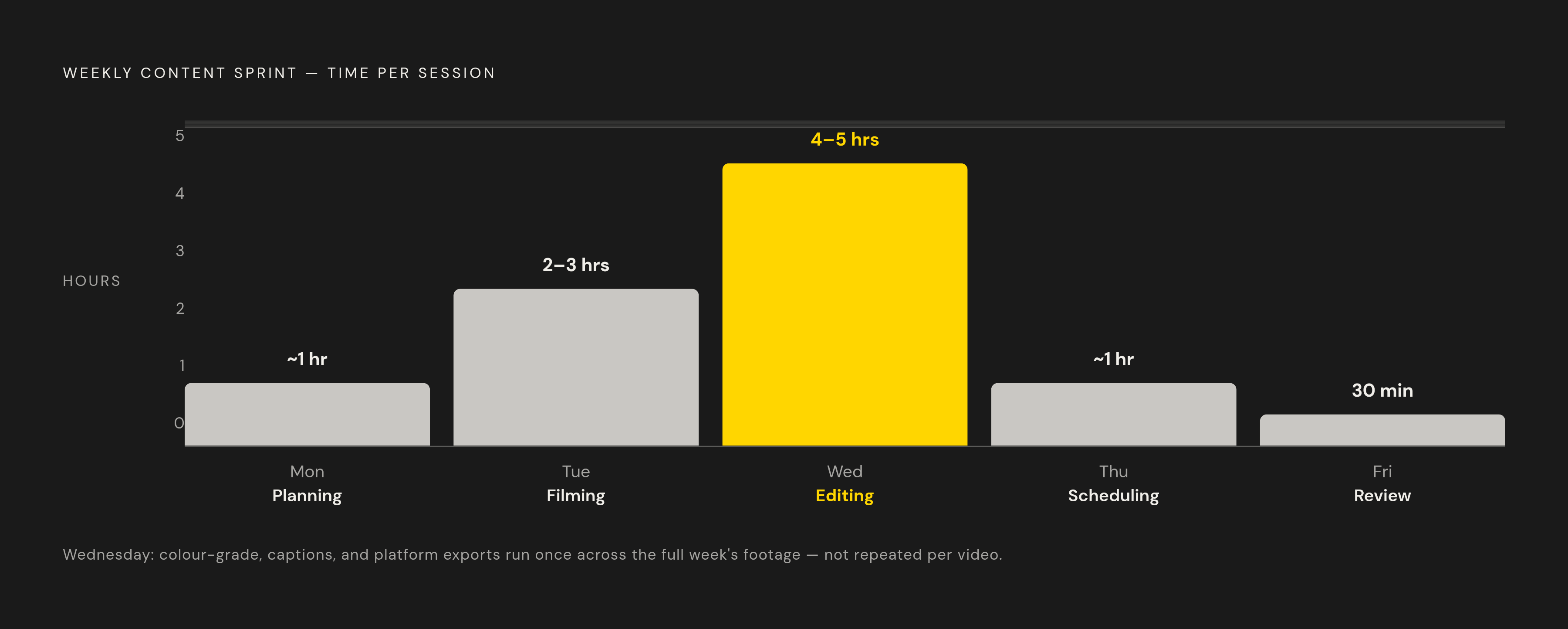
Task-type grouping needs a container to live in, and for a solo creator juggling a mixed schedule, the most practical container is a repeatable weekly sprint built from five short, role-specific blocks. The batch-once, post-daily model described in the July 2026 Substack piece structures the week into five distinct phases, plan, script, produce, review, and schedule, with each phase run as its own block and never combined with another.
A workable version of that sprint runs roughly as follows: planning on Monday, about an hour; filming on Tuesday, two to three hours; editing on Wednesday, four to five hours; scheduling on Thursday, about an hour; and a short performance review on Friday, around 30 minutes. Wednesday carries the most weight in this schedule, and it delivers the largest time savings in the whole system, because it treats an entire week's footage as one production run rather than several individual projects. Color-grading happens once, for every video in the batch, in a single session. Captions get added once, across the whole set. Every platform export, vertical, square, horizontal, gets generated in one pass rather than repeated video by video. Editing that way once at scale replaces doing the task seven times from a cold start.
The structural payoff appears outside the editing room too. Because production is fully separated from publishing, a creator is never scrambling to finish today's video today. Today's video was finished the previous week, and today's only job is to hit publish. That separation is what actually protects against burnout, because it removes the daily decision and the daily deadline in one move.
None of this depends on the exact cadence holding constant. The principle is what matters, not the schedule's shape: a creator with only one free evening a week can compress planning and production into a single block, and a creator who cannot sustain daily posting can batch for three or four videos a week instead of seven. What has to stay fixed is the separation between task types. The sprint also depends on one small supporting habit outside the five blocks: keeping a running list of ideas throughout the week. Momentum from Friday's review should feed directly into Monday's plan.
Setting a realistic output target before the session starts
A batch session needs a target before it starts, but the target should come from a quality floor, not from an arbitrary number of videos a creator decided to hit. Volume without depth produces thin, forgettable content, and thin content undermines the batch it came from, because a feed full of filler drags down every other video sitting next to it.
Shortzly's guide puts a realistic target for a three-hour recording session at 20 to 30 short raw recordings, and after AI clipping and a quality pass, that raw footage yields roughly 15 to 25 publishable clips, enough for two to three weeks of daily posting from a single afternoon of work. That is a meaningful return on one session, but the number only holds if the creator stops recording once the topic runs dry rather than pushing to hit a round figure. A tighter batch of genuinely useful clips outperforms a larger batch padded with material the creator was not deeply familiar with. The quality floor, not the count, decides when the camera turns off.
Creators who prefer a monthly rhythm instead of a weekly one face a different set of constraints. Kineclip's May 2026 guide sets a specific target range for a six-to-eight-hour monthly session, but only for creators with rigid, predictable daily schedules who can invest the upfront research needed to keep quality consistent across a full month of material. That upfront research is not optional for the monthly model. Filling a month's worth of publishing slots with timely, trend-driven topics creates a staleness problem by week three, when the trends have moved on and the content still hasn't published.
Fatigue sets a second, harder ceiling on both models. Kineclip notes that script quality degrades noticeably after six hours of continuous batching for most creators, and forcing a session past that point produces mediocre material that drags the rest of the batch down with it. The right stopping point comes when the work coming out of the session stops meeting the bar the rest of the batch was held to.
How to run each of the three task phases without letting them bleed into each other
Planning
The planning phase happens the day before production and runs one to two hours. Its only job is deciding what each video becomes before a camera turns on: topic, structure, hook, and format, locked in advance so nothing gets improvised on the day. Every decision made here is a decision the recording phase doesn't have to stop and make later.
Recording
Recording runs three to four hours, uninterrupted. Order matters inside this block: Shortzly recommends recording in energy order rather than topic order, filming high-energy performance pieces first while attention is sharpest, and shifting to quieter explainers or screen-share formats once energy naturally dips around hour three.
Physical setup should happen entirely before the first clip rolls. Flare describes spending 20 to 30 minutes staging every setup needed for the day, backgrounds, lighting, camera position, before filming starts at all, which avoids repeated repositioning between every single video. Each take should get slated verbally, with the creator stating the topic name out loud at the start of the clip. When 25 raw files are waiting to be processed later, that one extra second of labeling saves real time in the sorting that follows.
Self-editing has no place inside this block. Recording should continue through stumbles rather than stopping to redo them, because the recovery after a small mistake often reads as more authentic on camera than a clean delivery would, and stumbles are trivial to cut out later in processing. Brands or topics should never interleave mid-shoot. Flare's rule is to film every angle and every take variation for one brand or topic completely before breaking down that setup and moving to the next. Generic b-roll, hands on a product, texture shots, lifestyle filler, gets batched separately at the very end of the session, since it films fast and doesn't require the same on-camera energy the main takes do. Mixing b-roll into the main recording order only adds friction for no benefit.
Processing
Processing runs about two hours and is fully mechanical. Raw recordings go to an AI clipping tool that identifies the strongest segments, applies aspect-ratio conversion for each platform, adds animated captions, and exports everything in a single job. This is the stage where batch production multiplies output without adding proportional hands-on time.
Review happens on a phone, inside the actual platform the video will publish to, TikTok, YouTube Shorts, Reels, rather than on a desktop preview. Kineclip's guide recommends this specifically because watching a video in its real context catches problems a desktop preview misses, before the video ever goes live. By the fifth hour of the session, fatigue makes it easiest to cut corners here. After five hours of work, the temptation is to approve everything without a second look, but skipping the review step means a portion of weak content publishes anyway and drags the rest of the feed down with it. Clips should then get scheduled with real space between them across the week rather than published all at once, giving each piece room to build its own view count before the next one lands. The session should close with a short written note on what worked and what didn't, since that small habit speeds up the planning phase the following week.
Where AI Tools Fit in the Workflow
AI tools do their most valuable work inside the processing phase, replacing the slowest mechanical tasks in the entire system and freeing a creator's attention for the decisions that still require a human. The shift is concrete. Traditional workflows required manual scene detection, frame-by-frame color grading, manual subtitle creation, and separate reformatting for every platform. AI-enhanced workflows replace each of those with automatic content analysis, AI-driven color correction, auto-generated captions, and cross-platform optimization, all inside the same batch pass.
Descript changes the shape of editing itself by letting creators edit video the way they'd edit a text document. Its AI features include bulk deletion of filler words like "um" and "uh," along with automatic removal of dead air, compressing a 40-minute raw take into a tight 25-minute video in a small number of steps. Creators using it report cutting editing time substantially, turning what was a four-hour editing session into something closer to one hour.
Runway offers background removal, motion tracking, and AI-generated footage. It takes longer to learn than a simple captioning tool, but it can give a solo creator production results that once required an entire small team. Vizard.ai paired with CapCut Pro is recommended in the research as a combined stack for solo creators, including podcasters and YouTubers, with a modest combined monthly cost and a roughly 30-minute workflow integration setup.
Loopdesk's 2026 workflow guide shows what one AI-assisted recording session can produce in a single pass: one long episode becomes one main edit, five vertical clips with captions, and one newsletter cut, all decided before recording ever starts and all generated together rather than as separate projects. None of this replaces the planning phase or the recording phase. It replaces the manual labor sitting inside processing, the part of the week that used to eat the most hours for the least creative return. The frontier in 2026 has shifted from generation quality to production automation, so the question about any tool is not whether it can produce a usable clip but whether it removes a mechanical task from the week without adding a new decision the creator has to make in its place.
Sources
- Faceless Creator's Weekly Workflow (Batch Once, Post Daily)
- Content Batching for Short-Form Video: 2026 Guide
- Content Batching for Faceless Creators in 2026 — 30 Videos in One Day
- UGC creator batching workflow: shoot a month in 3 days
- Video Workflows for Creators (2026): 4 Systems That Scale
- Batch Content Creation Weekly Sprint: Template and Workflow